Editing/ Removing news posts
Login to your website editing
The first step is to always login to the editing of your website. To do this you just need to add '/wp-admin' to the end of your website address and press enter. For example:
You will be presented with a login page. If you have a dashboard, your login details will be the same as the ones you use for that.
If you can't remember your login details, please click the forgot your password link.
Navigate to the news post that you would like to edit.
Once you have found the news post, select "Edit Post" from the shortcut bar at the top of the page.

The news post will open in edit mode, allowing you to make any changes you need, such as updating the text, adding new information, correcting spelling or formatting, or uploading and replacing images.
Once you have finished making your changes, select "Save" to publish the edited news post.
Navigate to the news post that you would like to edit.
Once you have found the news post, select "Edit Post" from the shortcut bar at the top of the page.
The news post will open in edit mode, allowing you to make any changes you need, such as updating the text, adding new information, correcting spelling or formatting, or uploading and replacing images.
Once you have finished making your changes, select "Save" to publish the edited news post.
Navigate to the news post that you would like to remove.
Once you have found the news post, select "Edit Post" from the shortcut bar at the top of the page.
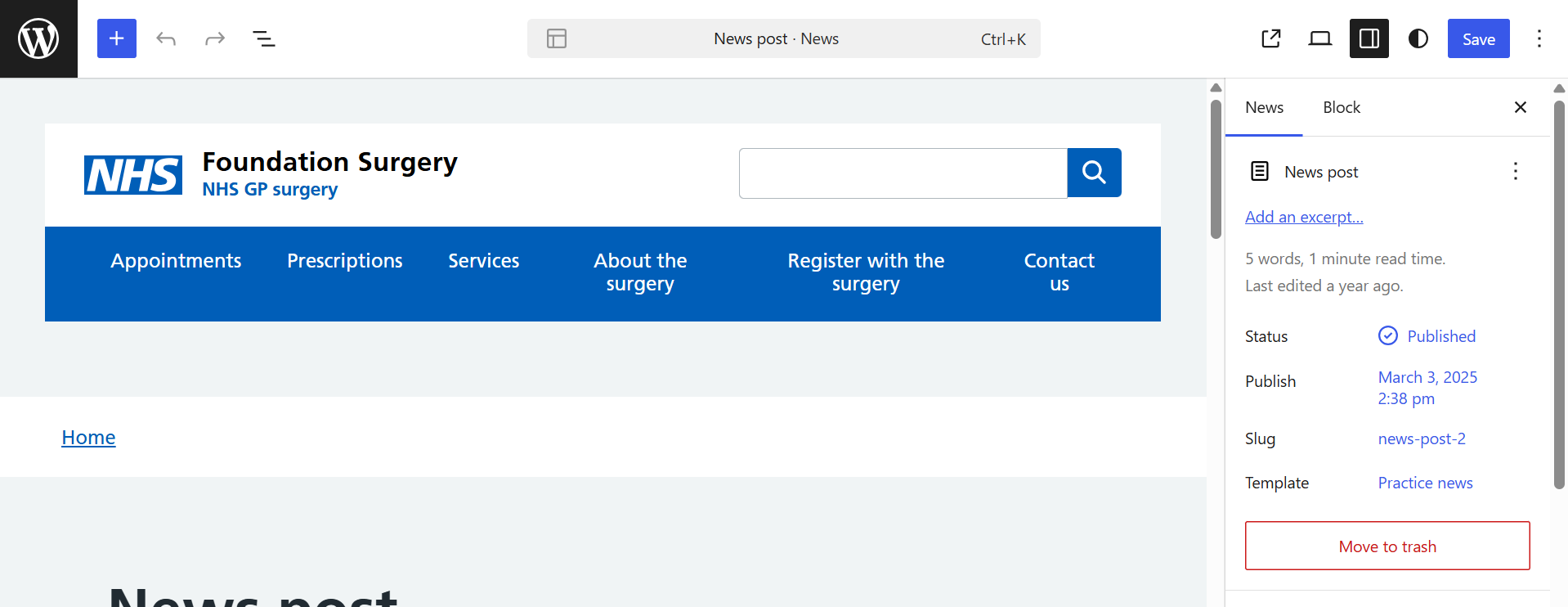
On the right-hand side of the page, locate the red "Move to Trash" button.
Select "Move to Trash" to remove the news post. The post will be moved to the Trash and will no longer be visible on your website.
You can also watch our short YouTube tutorial below which show these steps.
If you encounter any issues or need further assistance, please don't hesitate to contact our support team.
Navigate to the news post that you would like to remove.
Once you have found the news post, select "Edit Post" from the shortcut bar at the top of the page.
On the right-hand side of the page, locate the red "Move to Trash" button.
Select "Move to Trash" to remove the news post. The post will be moved to the Trash and will no longer be visible on your website.